
 Services
  Technologies
  About
About Success




What is AWS Glue? ETL, Data Integration, and When to Use It vs Alternatives
Share article


Table of Contents
AWS Glue is Amazon’s serverless data integration service. It pulls data from different sources, cleans it up, and loads it somewhere your team can actually query, without anyone provisioning or managing a server.
That’s the short version.
The longer version involves a few moving parts: crawlers, a data catalog, Spark-based jobs, and a handful of extra features that handle different stages of getting raw data ready for analytics.
Here’s what AWS Glue actually does, when it earns its place in your stack, and how it stacks up against tools like Fivetran, Talend, and Azure Data Factory.
What Is AWS Glue?
Most companies have data scattered across a dozen systems. Databases, SaaS tools, log files, spreadsheets sitting on someone’s laptop.
None of it shows up in a clean, ready-to-use format. Before a number lands on a dashboard, someone has to pull it from its source, fix the formatting, match it against other data, and load it somewhere people can query it.
AWS Glue automates most of that work. It connects to the source, figures out the schema, and runs the scripts that clean and reshape the data before loading it into a warehouse, lake, or analytics platform.
Glue can connect to more than 70 data sources and catalog everything centrally. Your team isn’t digging through raw files by hand every time someone needs an answer.
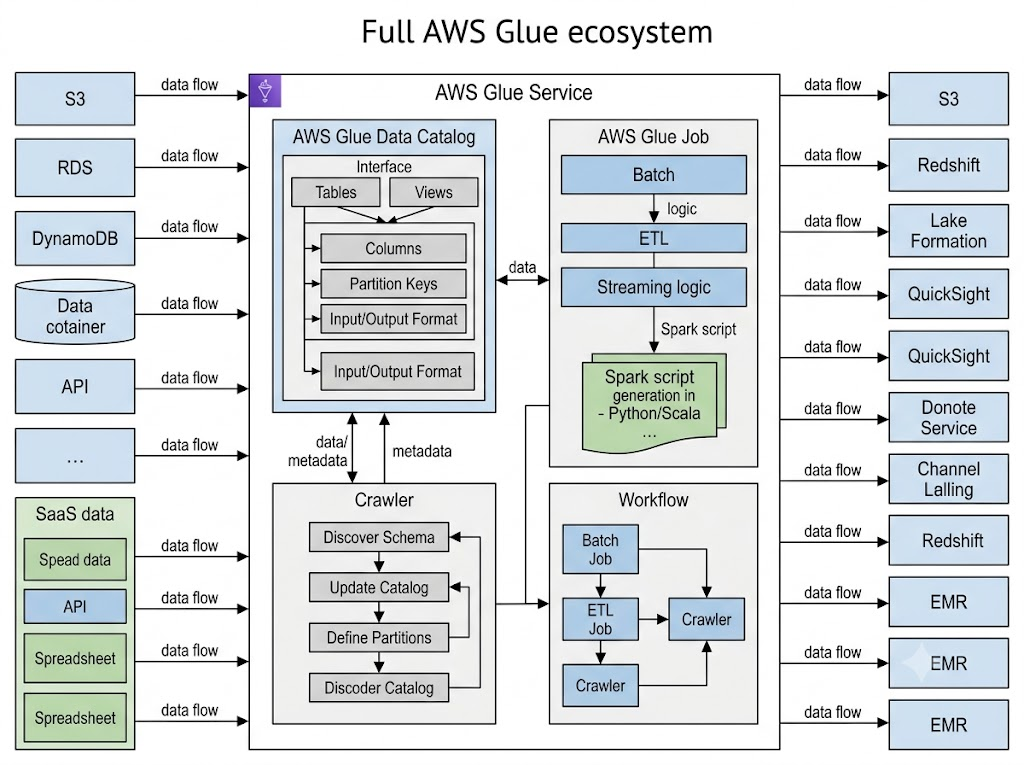
It also supports more than one processing style. You can run batch ETL jobs, ELT jobs that load first and transform later, or streaming jobs that process data as it lands. A retail team batching nightly sales numbers and a logistics team watching live shipment data can both run on the same service, just configured differently.
Without something like Glue, most of this falls on a data engineer writing and maintaining custom scripts for every source and format. That work multiplies fast once you add a fifth or sixth system into the mix.
How AWS Glue Works
AWS Glue is built from a handful of connected parts that work together to move data from a source to a destination. Once you know what each piece does, it gets a lot easier to plan a pipeline and figure out where Glue actually fits in your stack.

The AWS Glue Data Catalog
The AWS Glue Data Catalog works as a central index for your datasets. It stores table definitions, column types, partitions, and other metadata, so services like Amazon Athena, Amazon Redshift Spectrum, and Amazon EMR can find and query your data without you redefining the structure in each tool. Most teams end up treating the Data Catalog as the place to check first when someone asks what data actually exists.
Crawlers and Schema Discovery
A crawler scans a data source, maybe a database, an API, or files sitting in Amazon S3, and works out the schema on its own. It writes that schema into the Data Catalog as a table. When new data lands or a schema shifts, you run the crawler again and the catalog updates. This saves real time for businesses pulling data from partners who don’t all use the same format, since the crawler adapts instead of someone manually rewriting table definitions every time something changes.
Connecting to Your Data Sources
AWS Glue connects to relational databases, NoSQL stores, SaaS applications, and files in S3 through built-in connections. You set up an IAM role with the right permissions, then point a crawler or job at the source using that connection. For anything sitting behind a private network, Glue reaches it through a VPC endpoint, which keeps the traffic off the public internet.
Jobs and the ETL Engine
A job is where the transformation logic actually lives. AWS Glue generates a starting script in Python or Scala, built on Apache Spark, and you can edit that script directly or build it visually in AWS Glue Studio. Jobs read from your sources, apply whatever transformations you’ve defined, joining tables, renaming columns, filtering out bad records, and write the result to your target.
Triggers and Workflows
Triggers fire crawlers or jobs on a schedule, on demand, or when something happens, like a new file landing in S3. Workflows chain several jobs and crawlers together, so one event can set off an entire pipeline from start to finish, with each step waiting on the one before it.
Main Features That Set AWS Glue Apart
Past the core architecture, AWS Glue packs in features built for different kinds of users: engineers who want to write Spark code by hand, and analysts who’d rather drag and drop.
AWS Glue Studio for Visual ETL
AWS Glue Studio gives you a drag and drop canvas for building pipelines. Connect your sources, add transformation steps, pick a destination, and Glue Studio writes the script underneath. Open it up and tweak the code yourself if you need something more specific. Engineers and less technical users end up working in the same pipeline this way.
Support for ETL, ELT, and Streaming
AWS Glue handles batch ETL, ELT where transformation happens after loading, and streaming through Glue streaming ETL jobs. One service covering all three means teams skip the hassle of running separate tools for batch work and streaming work.
AWS Glue DataBrew
AWS Glue DataBrew is a visual tool for cleaning and normalizing data without writing code. Analysts get over 250 prebuilt transformations to catch and fix data quality problems, missing values, inconsistent date formats, stray whitespace, before that data ever reaches a Glue ETL job.
Built-in AI Assistance
Recent updates added generative AI features that help write ETL code, troubleshoot Spark jobs, and modernize older scripts. Teams without deep Spark expertise on staff can move faster, and upgrading old jobs written for earlier Spark versions takes a lot less manual digging.
Common Use Cases for AWS Glue
All of that adds up to a handful of jobs Glue gets used for again and again. These are the ones that come up most across the teams running it.
Building a Data Lake

Plenty of companies dump their raw data into Amazon S3 and treat it as a data lake. Glue catalogs that data, cleans it, and organizes it into tables people can actually query. Pair it with AWS Lake Formation and you also get access control and governance across the lake. Analysts end up with one well-described place to look instead of hunting through scattered systems.
Prepping Data for Analytics and BI
Dashboards are only as good as the tables behind them. Glue turns messy source data into clean, consistent tables that BI tools can read. Once the catalog is populated, analysts query through Amazon Athena or load curated tables into Amazon Redshift for faster reporting. The payoff is decisions made on numbers people trust.
Feeding Machine Learning
Models live or die on their training data. Glue cleans, joins, and formats raw inputs so they are ready for model building in Amazon SageMaker, and it scales to the large datasets that machine learning usually demands. Mostly it takes the tedious prep work off the data scientist’s plate.
Migrating Legacy ETL

A lot of older ETL still runs on self-managed servers that cost money whether or not a job is running. Moving those pipelines to Glue swaps that standing infrastructure for a serverless, pay-per-use setup. In practice it means rebuilding the existing transformation logic as Glue jobs and pointing crawlers at the sources.
This is the kind of project Renova Cloud’s data integration and AWS Glue migration services handle without disrupting day-to-day operations.
How Much Does AWS Glue Cost?
Glue bills each feature separately, so what you pay depends on which parts you lean on and how hard. The figures below are for the US East (N. Virginia) region and shift by region, so confirm yours on the official AWS Glue pricing page.
| What you pay for | Price (US East, N. Virginia) | How it is billed |
| ETL jobs and interactive sessions | $0.44 per DPU-hour | Per second, 1-minute minimum |
| Flex execution (non-urgent jobs) | ~$0.29 per DPU-hour | Per second |
| Crawlers | $0.44 per DPU-hour | Per second, 10-minute minimum |
| Data Catalog storage | First 1M objects free, then ~$1 per 100,000 a month | Monthly |
| Data Catalog requests | First 1M free, then ~$1 per million | Monthly |
| Schema Registry | No charge | Included |
Paying for Jobs by the DPU
A DPU, or Data Processing Unit, is how Glue measures compute, and one of them gives you 4 vCPUs and 16 GB of memory. Job costs stay low because of the billing model: you pay by the second only for the time a job actually runs, so an idle machine never lands on your bill. A job using 2 DPUs for half an hour, for example, burns 1 DPU-hour and works out to about 44 cents.
Catalog and Crawler Costs
The Data Catalog is generous before it charges anything, with a free million stored objects and a free million requests every month. Most small and mid-sized workloads never cross that line, so catalog charges often round to nothing. Crawlers can creep up, though, because they bill at that same DPU-hour rate. Schedule them only as often as your data actually changes.
Keeping the Bill Down
A few habits keep spending sensible. Flex execution is the biggest lever for non-urgent batch work, trading a delayed start for a lower rate. Sizing DPUs to the real job stops you paying for compute you never touch, and folding several small steps into fewer jobs cuts the overhead of spinning each one up.
Watch out for: the most common first-month surprise on a Glue bill is a development endpoint or interactive session left running after you finish with it. Shut those down and you skip the charge completely.
The AWS Glue features page lays out the options if you want to go deeper.
AWS Glue vs the Alternatives
Glue is a sensible default for serverless ETL, but it is one choice among several, and the right one depends on your workload, how much control you want, and how your team likes to work. Here is the short version before the detail.
| Tool | Best for | Trade-off against Glue |
| AWS Glue | Serverless ETL inside AWS | Less control than a hand-tuned cluster |
| AWS Lambda | Quick, event-driven tasks | 15-minute cap, not built for heavy ETL |
| Amazon EMR | Large, constant big-data jobs | You manage and tune the clusters |
| Apache Airflow / MWAA | Orchestrating multi-step workflows | Does not do the transformation itself |
| Fivetran, Matillion, Talend | SaaS connectors, low-code setup | Separate vendor, sits outside AWS billing |
Glue vs AWS Lambda
AWS Lambda runs small bits of code in response to events and shines at fast, lightweight tasks. It also caps out at 15 minutes per run, which rules it out for heavy data processing. Glue is built for the large, longer-running ETL that Lambda cannot sit through. The two often team up. Lambda notices a new file land in S3 and fires off a Glue job to process it. Use Lambda for the trigger and the quick stuff, Glue for the heavy lifting.
Glue vs Amazon EMR
Amazon EMR gives you managed Spark and Hadoop clusters with deep control over how they are configured. It tends to win on very large, complex jobs where you want to tune everything, and at high, steady volume a well-tuned cluster can come in cheaper per unit of work. The cost is your time, since you are the one managing and tuning those clusters. If low operational overhead matters more to you than fine-grained control, Glue is the easier call.
Glue vs Apache Airflow and Amazon MWAA
Apache Airflow is an open-source orchestrator for scheduling and coordinating tasks across systems, and AWS runs a managed version called Amazon Managed Workflows for Apache Airflow. It overlaps with Glue but solves a different problem. Airflow is good at chaining and scheduling complex, multi-tool workflows. Glue does the actual data transformation. A common setup uses Airflow to run a series of Glue jobs and other steps in the right order, so reach for it when the challenge is coordination rather than transformation.
Glue vs Third-Party ETL Tools
Tools like Fivetran, Matillion, and Talend sell managed connectors and, in some cases, a low-code or no-code interface. They can get you running fast, especially for syncing data out of common SaaS platforms, and some teams simply prefer the experience. Glue keeps everything inside AWS, ties in tightly with the rest of the stack, and bills as you use it with no separate contract. The decision usually comes down to how much of your world already lives in AWS and whether you would rather hand connector maintenance to someone else.
When to Use AWS Glue

AWS Glue fits some situations better than others. The decision usually comes down to where your data already lives and how much your team wants to build versus configure.
Good Fit Scenarios
AWS Glue tends to work well when:
- Your data already lives mostly inside AWS, across services like S3, RDS, DynamoDB, or Redshift
- Your team includes engineers comfortable with Python, Scala, or Spark
- You need a central catalog that multiple analytics tools can share
- Your workloads vary in volume, so pay-per-job pricing beats a flat subscription
- You expect to scale from gigabytes to petabytes without rebuilding the pipeline
When It Might Not Be the Right Choice
Glue can feel like overkill if your team wants a no-code, fully managed connector experience with minimal setup. Tools like Fivetran or Hevo get a simple pipeline running faster for teams without dedicated data engineers.
Glue also carries a real learning curve around Spark concepts. Smaller teams without engineering support sometimes find the setup heavier than they expected going in.
If your integration needs amount to a handful of SaaS connectors feeding one dashboard, a lighter managed tool will probably get you there faster.
Some teams land on a hybrid setup instead. They use a connector tool for the easy SaaS sources and Glue for the handful of pipelines that need real engineering.
Get AWS Glue Set Up Right with Renova Cloud
Getting Glue working is one thing. Getting it working efficiently, and keeping the bill sane as you scale, takes planning.
Renova Cloud, an AWS Premier Partner in Vietnam, helps enterprises build and migrate data integration on AWS Glue with cost optimization built in from day one.
The team designs ETL workflows, sets up crawlers and the Data Catalog, moves legacy pipelines to a cloud-native model, and centralizes data lakes so analysts and data scientists can move faster.
Whether you are starting a data lake, modernizing old ETL jobs, or prepping data for machine learning, Renova Cloud brings proven AWS experience to the work.
Talk to our cloud experts about the right approach for your data.