 Services
 Technologies
 About
 Success




Automating Technical Design Checks with AWS Quick: A Use Case for Manufacturing and Retail
Checking every label and packaging design by hand takes hours, and a missed error costs more once printing has started.
This use case shows how an application built on AWS Quick, formerly Amazon Quick, can automate technical design checks by bringing design approvals, automated print checks and inspection results into one workflow.
This article explains where technical design checks are needed, how the application works, and how other industries can apply the same approach.
Vy Pham
Marketing & Admin
Share article


Table of Contents
Consider a dairy manufacturer preparing packaging for a seasonal campaign. Before printing starts, every label has to match the technical requirements. Checking each sample by hand can take hours, and when people review the same requirements again and again, it is easy to miss something.
With AWS Quick, a team can build an application that checks each sample against the requirements it provides and flags potential issues. From creating a request to uploading and checking a sample, every step is connected in one workflow, so that the way your team can automating technical design checks.
The application described here runs on AWS Quick, the AI workspace that AWS renamed from Amazon Quick in November 2026.
→ If the platform is new to you, our guide to what AWS Quick is covers its features first.
Where Are Technical Design Checks Needed?
A technical design check confirms that one version of a file matches another version or a standard. It is needed wherever a design moves between teams or systems before it is printed or published. Manufacturers check labels and packaging, and retailers check items such as hangtags and shipping labels.
| Group | What gets checked | Typical industries | Examples |
| Labels and packaging | Design file against the file sent to the printer | FMCG, pharma, food and beverage, cosmetics | Milk packaging, medicine labels, cosmetic boxes |
| Marketing materials | Original artwork against resized or adapted versions | Marketing, agencies, printing, publishing | Billboards, web banners, brochures, posters |
| Production and operations labels | Standard template against files printed automatically from a system | Manufacturing, logistics, retail | Component labels, shipping labels, hangtags |
This article focuses on these groups. The packaging example below is one case from the first row.
Other Industries and Functions
The same approach can apply to other industries and business functions. Each has its own data, rules and approval steps, so the application and the way it is used differ from one company to another.
Why Manual Design Checks Fall Short
Manual checking creates three problems:
- Time: reviewing each sample against the specification can take hours.
- Repetition: reviewers check the same requirements again and again, which makes mistakes easier to miss.
- Cost: an error found after printing begins costs more time and money than one found at the design stage.
An automatic check moves error detection earlier and leaves reviewers to focus on the samples that need attention.
How AWS Quick Automates Technical Design Checks
This application was built on AWS Quick. The team described what it needed in natural language, and Quick generated the application, which the team then refined. The approval steps and the check rules are logic set in the application, and the application is built and published inside Quick, a managed service, so there is no separate infrastructure to set up for it.
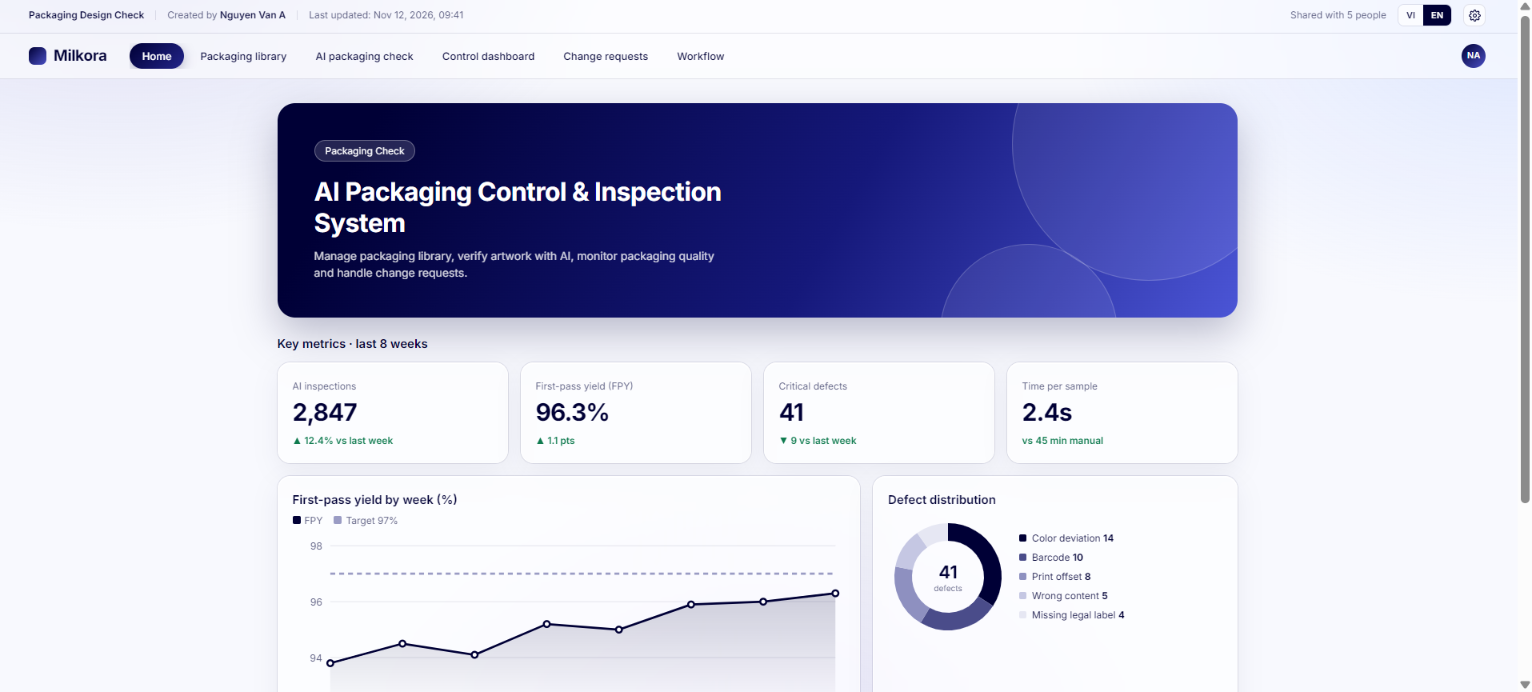
Image 1: Automating technical design checks with an AWS Quick application [Source: Renova Cloud]
A Seven-Step Check Workflow
Three roles take part: the requester, one or more approvers (the number of approval levels is configurable) and the system.
- Create request: the requester starts a check request.
- Approve request: an approver reviews and approves the request.
- Upload design: the requester uploads the design file.
- Approve design: an approver reviews and approves the design.
- Upload print and GAP check: the requester uploads the printed sample, and the system compares it with the approved design.
- Approve print: an approver confirms the print.
- Completed: the request is closed with its full history
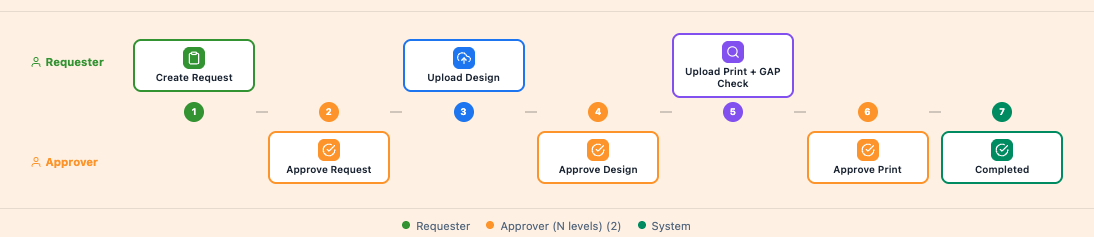
Image 2: The seven-step design check workflow, from request to completion. [Source: Renova Cloud]
Automatic Checks Against Your Rules
At step 5, the application checks the printed sample against the approved design and the rules set for that product. It flags potential discrepancies, so reviewers can concentrate on those items instead of re-checking every requirement by hand. A person still gives the final approval, and the accuracy of the image check should be validated against your own standards before rollout.
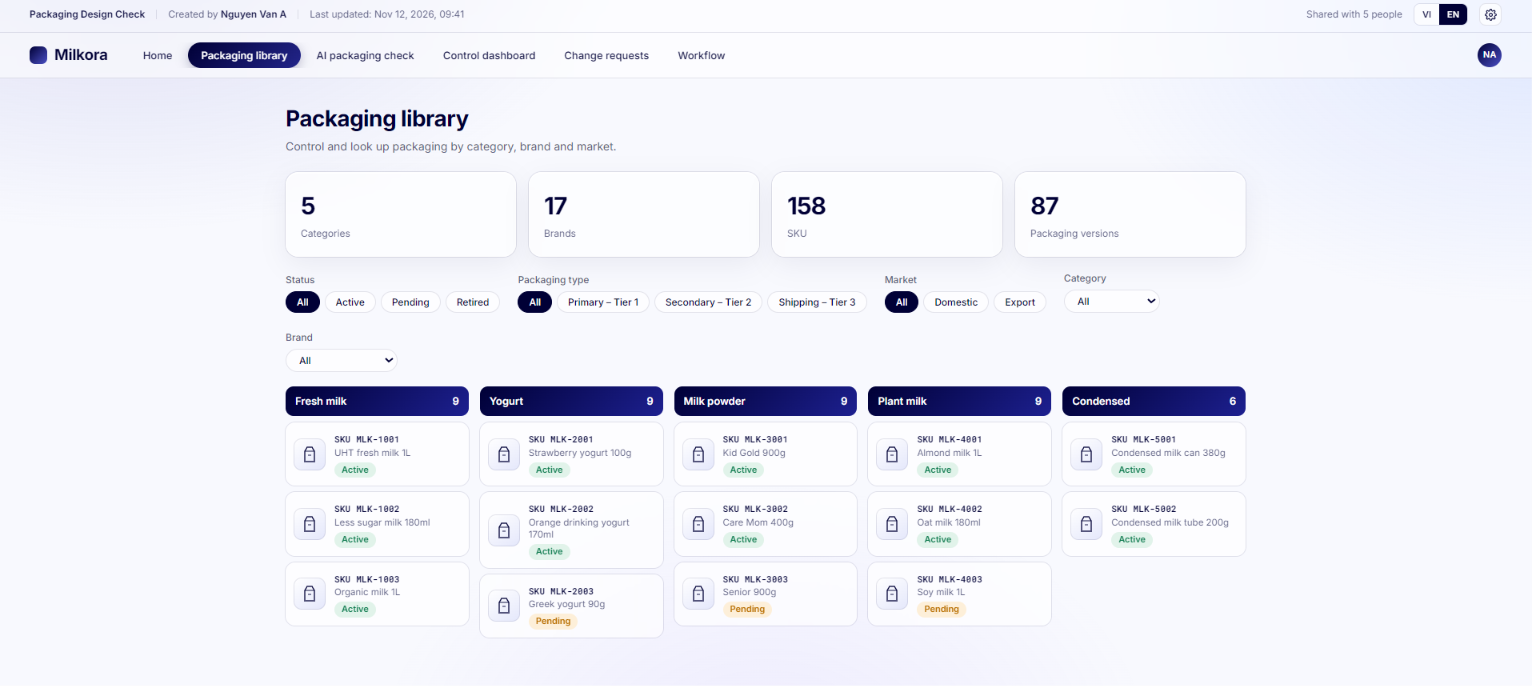
Image 3: The packaging library in the application, where packaging designs are stored. [Source: Renova Cloud]
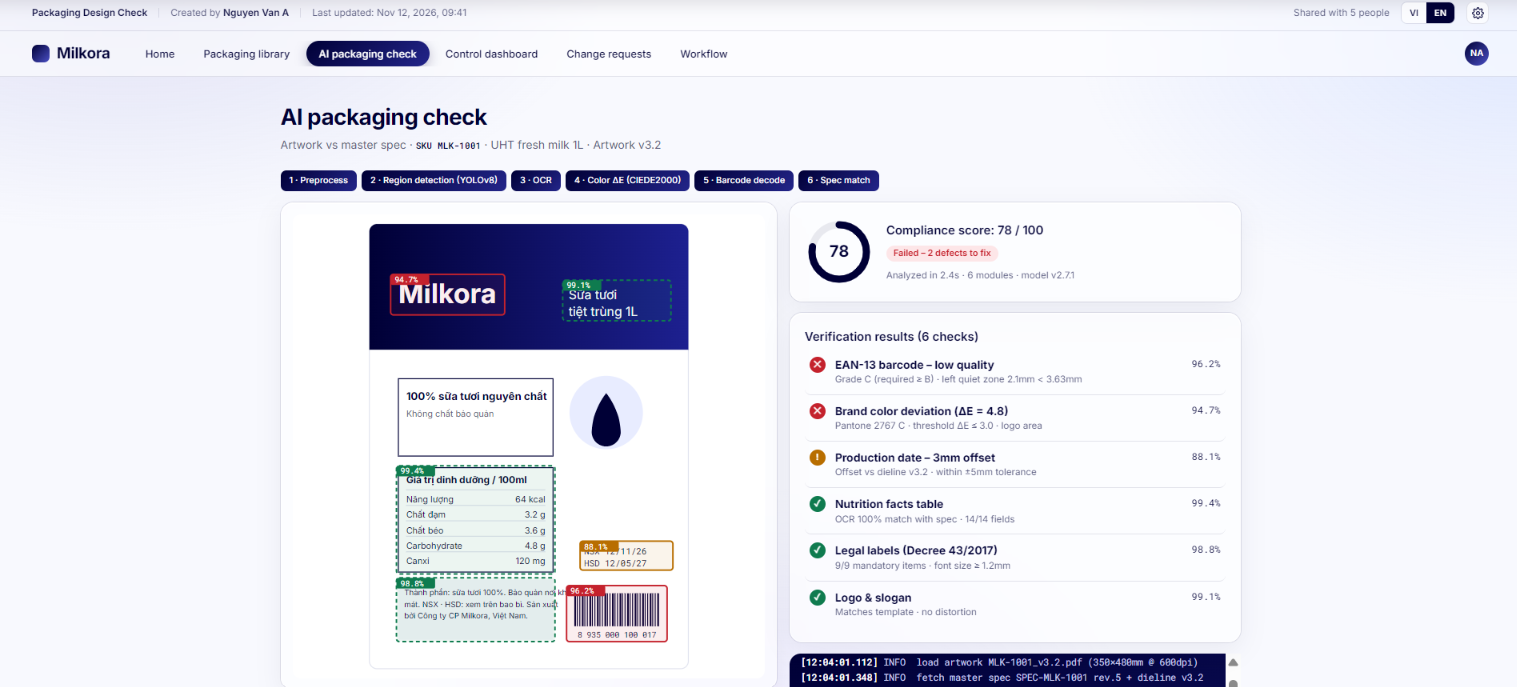
Image 4: AI check results flagging differences between a printed sample and the approved design. [Source: Renova Cloud]
Tracking technical design check results and performance
Checked samples are grouped by packaging category and by production batch. For each sample, the dashboard shows whether it passed and, if not, the reason. A second view tracks the performance of the scans over time, so teams can see how many samples pass and where problems repeat.
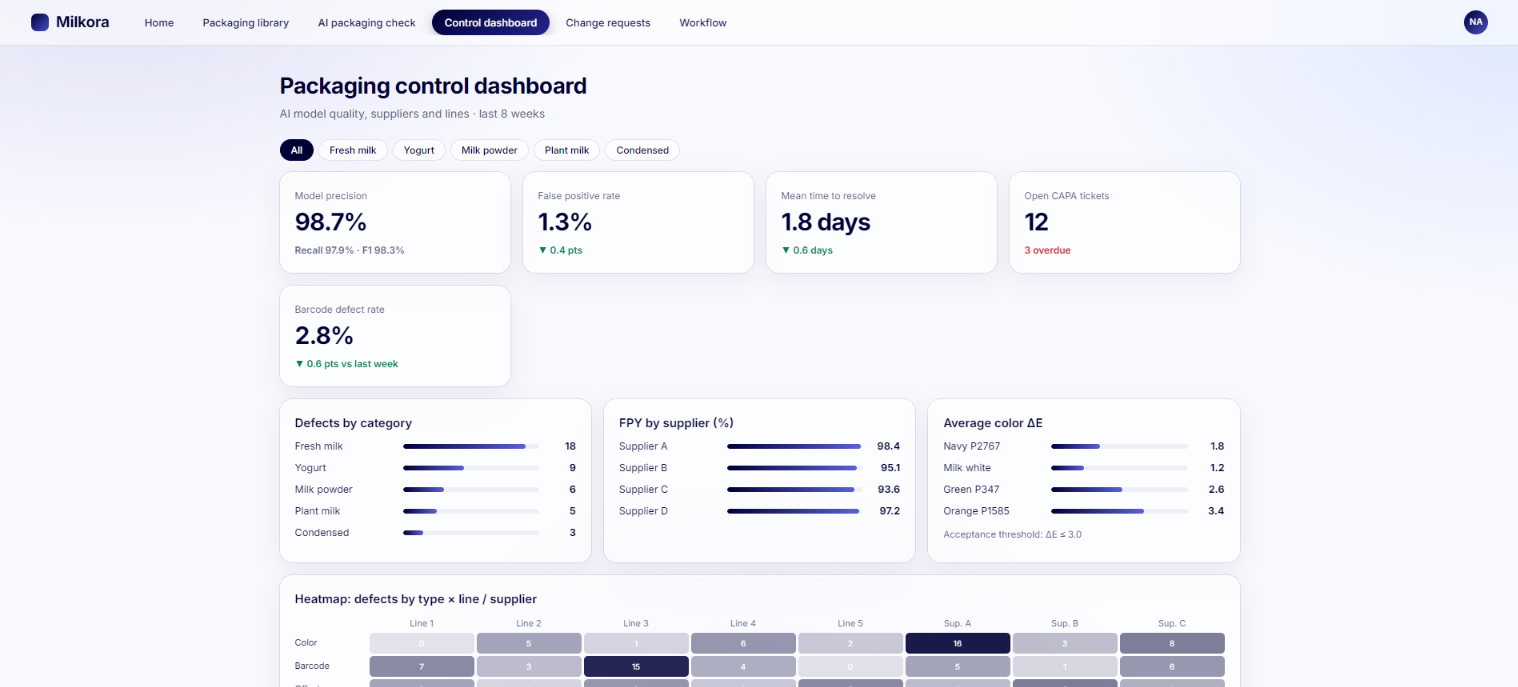
Image 5: Dashboard of packaging check results by category and batch. [Source: Renova Cloud]
Building and Changing the App in Natural Language
Building the application works like AI-assisted app building: you describe what you need, and Quick builds it. AWS Quick can work with documents and data sources already connected to your workspace, so teams can build applications that use existing business information without uploading the same files each time.
Changing the application follows the same pattern. To adjust a step, a field or a dashboard view, the team describes the change in plain language and Quick updates the app.
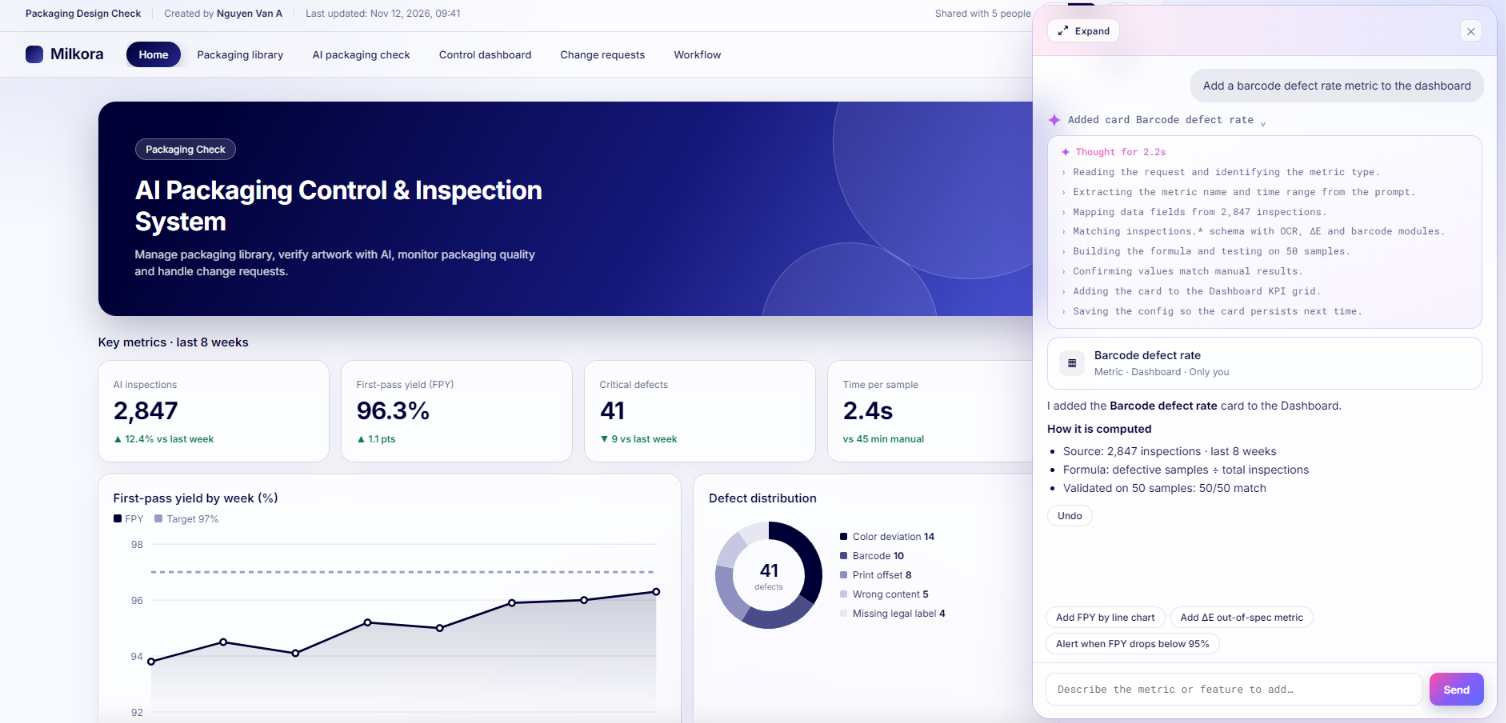
Image 6: Editing the application with a natural-language prompt. [Source: Renova Cloud]
Why Run This Application on AWS Quick?
A design check application can be built in many ways. Building it on AWS Quick has four advantages:
Build faster, simplify workflows, and scale without adding complexity.
- From idea to application in days, not months. Traditional custom web apps require separate front-end, back-end and hosting development. With Amazon Quick, business teams can build applications, AI-powered checks, dashboards and workflows in days, without starting from scratch.
- One platform, connected workflows. Bring applications, AI agents, dashboards and workflow automation together in one environment. Instead of stitching together multiple SaaS tools, teams can connect checking, approval and reporting in a single workflow.
- Tailored to your business, accessible to every department. Describe your business processes, requirements, data fields and rules in natural language. Teams across sales, trade marketing, operations and QA can build and adapt applications to their actual needs, without relying entirely on IT.
- Enterprise-grade security and governance. Built on AWS, Amazon Quick integrates with AWS identity and security capabilities to help protect access to business applications and connected data. AWS also states that customer data remains under customer control and is not used to train third-party foundation models.
- Managed infrastructure that scales with your business. As a managed AWS service, Quick reduces the need to provision and maintain separate application infrastructure. Add new brands, SKUs, stores or markets without rebuilding the application. Renova Cloud can also apply the same development approach across use cases such as retail inspections, predictive maintenance and sales portals.
The result: less time building tools, fewer disconnected workflows, and more time solving real business problems.
Using AWS Quick with Renova Cloud
Your team knows its own review process best, and AWS Quick lets it describe the application it needs in plain language. The aim is to automate the repetitive checking work and shorten the whole process, from the first request to the approved print.
Renova Cloud, an AWS Premier Tier Services Partner in Vietnam with the AWS AI Services Competency, supports the technical side of AWS Quick:
- Set up: configure AWS Quick for your organization, including sign-in and plans.
- Connect and secure: connect your file sources and set access by role.
- Validate: advise on testing the checks on your real samples, so you know where human review stays in the process.
- 24/7 support: a team that supports you in both Vietnamese and English, around the clock.
- Local billing: invoices in Vietnamese and payment in VNĐ.
Want to automate your design checks?